

Creating music is now simple with the help of AI tools. I enjoy hip-hop storytelling, so I decided to try Suno AI to create my own song. In this guide, I will explain each step so you can create your own song easily. Whether you are new to this or love music, this tutorial will help you get started.
Step 1: Generate Lyrics with ChatGPT
I started by using ChatGPT to create lyrics for my song. I shared the theme and mentioned that I wanted a hip-hop storytelling style. ChatGPT provided a draft based on my input.
Step 2: Refine the Lyrics
If you are not satisfied with the lyrics, you can keep generating new versions until they fit your vision better. You can provide more instructions for ChatGPT to adjust and improve the lyrics. You can also use Suno AI to create lyrics directly.
Step 3: Log Into Suno AI
When your lyrics were ready, login your Suno AI account. Then, click “Create” in the menu bar, which took you to the song creation section.

Step 4: Input Lyrics and Choose Music Styles
You select “Custom” option and paste your lyrics into the text box provided. In the “Styles of Music” section, select music styles that you want. I selected hip-hop, piano, and drums as my preference.
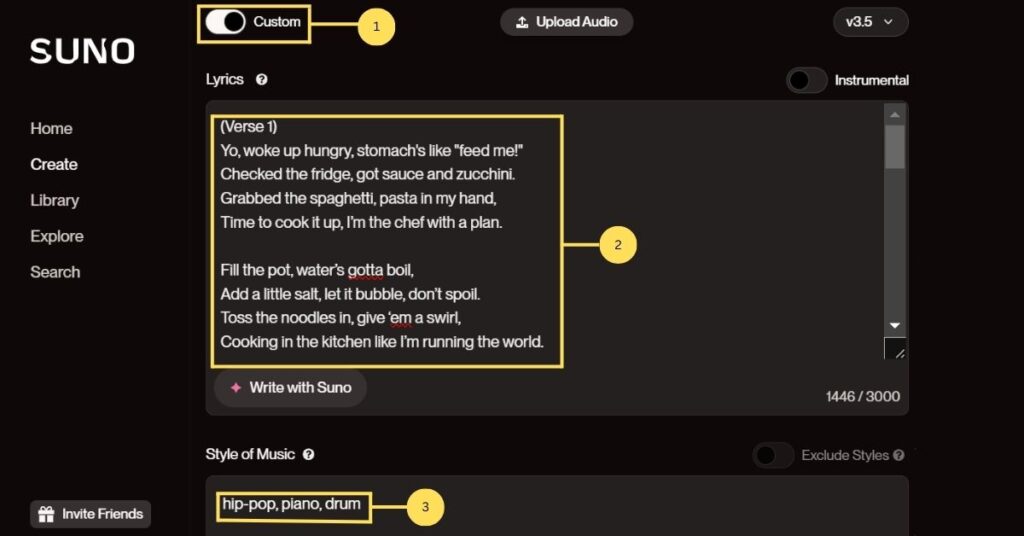
Step 5: Generate the Song
After filling in the details, click “Create” button to generate songs. Suno AI created two versions of the song for you to choose from each time.
Step 6: Review and Refine the Output
You should listen to both versions carefully to make sure the song does not have unwanted sound. If you wasn’t satisfied, you can generate new versions until you find the version that matched your expectations.
Step 7: Download the Song
Once you was happy with the result, click the three bullet icon beside each of the tracks. Then, select “Download” option. In the “Download” option provide 3 option for you to downloaded the song. The 3 options were audio option, video option which download the song with lyrics, and the last option was generate video for the song. This step was quick and easy, allowing you to move forward without any trouble.
Step 8: Edit and Finalize
Finally, you can use audio editing software to refine the track. You can adjust the stems, add effects, and improved the overall quality of the song.
Let’s listen to my final result of my song:
Conclusions
Creating a hip-hop song with Suno AI was a simple and enjoyable process. The platform makes it easy to turn ideas into finished songs, even for beginners. If you want to try music creation, Suno AI is a great tool to use.
Start your journey today and explore what you can create!
Related Topic:




